November 13th, 2025
Release v2.35
This release includes several features to make common actions in Stackd faster and easier.
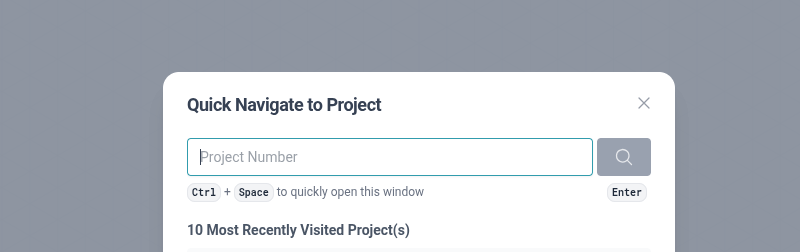
Add Project Quick Navigate
Shows up as a # symbol next to the “Projects” menu item on the left
Clicking on this (or pressing the keyboard shortcut ctrl+space) opens a way to quickly enter a project number to navigate to or select from a list of recently visited projects
Timesheets time entry improvements
Add ability to delete timesheet entries (would have to enter 0 hours in past)
Add ability to change all parts of a timesheet entry including date and project
Split SCRN selection out of Phase and into its own select (only applicable for Projects with an SCRN)
Add discipline to the project entry list (defaults to top internal discipline in global list)
This now used to correctly populate discipline for timesheet entries during invoicing
Remove the need to first add a project or overtime category before adding time to them
Clicking add Project Time or add Overhead Time now just let’s you select the Project/Overhead Category and add time in one step
Add ability ability to add time directly from the project page
Add setting to disable requiring users to first submit the previous timesheet before adding time to a subsequent one (Timesheet Require Submit Previous)
Better support multiple timesheet entries on a single day
Hovering over the total time for a date will show the entries in a pop-up
Clicking on any of these entries will edit them
Clicking on the “Add New” entry will start adding a new entry for that project
Clicking on the total time will always edit the most-recently added entry for that date
Indicate the number of entries (if more than 1) for a date under the total hours
Allowing viewing existing timesheet entries for submitted timesheet periods
Add 2 Factor Authentication (2FA)
Users can enroll in 2 factor authentication to make login more secure
2FA is required to view HR Information for users (highly sensitive information)
We no longer store any personally identifying information
2FA is remembered for a short duration
Add a notes section to HR Information
Project Tags v2
Add a Project Tags to Design Information
Project tags belong to a Group
Project tag groups can be configured in System > Lists > Project Tag Groups
Each group belongs to a discipline which determines where in Design Information the tags show (in the Design Scope section for that discipline)
Update System > Tags page to have tabs/sections for Client Tags and Project Tags
Allow filtering by Projects Tags on the Projects page
Replaces existing Structural building information in Design Information
Existing structure data has been converted into Project Tags
Invoice export
Add ability to Export an invoice
Only Quickbooks CSV format supported at the moment
Add ability to mark invoices as exported and filter by export status
Add bulk actions to Invoices page
Add ability to Export multiple invoices at once (in a single csv file)
Add ability to mark multiple invoices as sent at once
Update invoices page to show project information more like project billing page
Add ability to change number of invoices per page
Make invoices table header and footer sticky
Add ability to filter invoices by Project Manager
Employee and personnel performance reports
Added improved KPI reports on the System > Users page under “Reports” (top-left, next to add user)
Employee performance report
Includes a breakdown of hours for a specified period
Includes common metrics like Utilisation Rate and Effective Bill Rate
Personnel performance report
Includes a summary of employee performance report details for all employees
Improve user de-activation
Add a filter toggle to include deactivated users on Users page
Add ability to re-activate users
Add a setting and permission to view deactivated users
The permission is under System and is called “View Deactivated Users”
This also controls if the filter option appears in System > Users
The setting is “Display Deactivated Users in Dropdowns”
This does not affect the filter option in System > Users
Both the setting needs to be on and the permission granted for a user to see deactivated users in lists
This is primarily intended for admin users to always have the permission, but only turn on the setting when they need it (to remove a user from a project or similar). The permission prevents other users of the system (who do not have it) from seeing the deactivated users in lists, even when the setting is on. This is done the avoid confusion.
Improve handling of deactivated users in several areas
Improve client delete and restore
Previously, only a client with no projects or invoices could be deleted
Now, only open invoices will prevent client deletion
Existing closed invoices for client will still show in the Invoices lists
Existing projects for client will still show in the Project list
Add ability to restore a deleted client
Move Payments Received out of Accounting and Into Invoicing
Move Sub-consultant Invoices out of Accounting and Into Invoicing
Add a setting to enable per-client project rates (rates list)
Add a setting for Field Review Intro
Add button and setting to break SCRN items into separate lines on proposal invoices
Increase the max size of invoicing comments fields
Add ability to rename Roles when editing an Invoice
Add a bulk action to change Role for selected Timesheet items when editing an Invoice
Add ability to edit rates when editing an Invoice
Includes a bulk action
Add ability to edit roles when editing an Invoice
Only available as a bulk action at the moment
Roles can be renamed by clicking on the pencil icon when hovering over the role row
Add ability to specify the date when bulk marking payments received as deposited
Add ability to view these changelog entries from inside Stackd (newspaper icon in the bottom-left of screen)
Will automatically show after an update with noteworthy changes is released