June 9th, 2025
Release v2.29
This release focuses on allowing users to manage custom pre-filled document templates as well as improving the documents received section in projects to allow uploading a larger variety of documents to be uploaded.
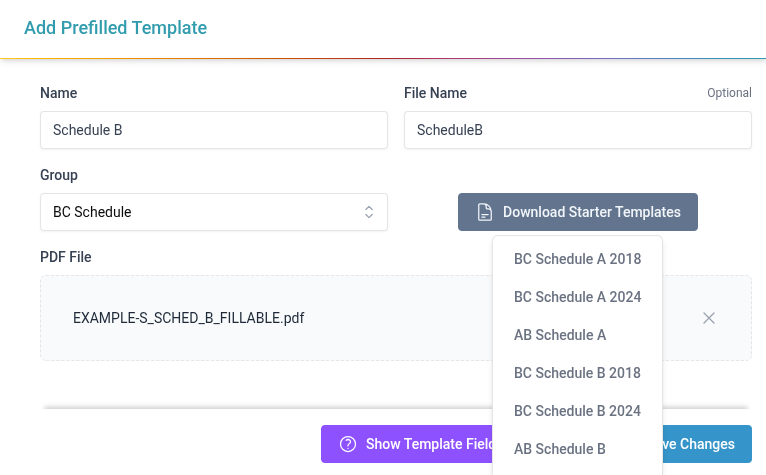
Add the ability to manage pre-filled document templates
Add a new section in Templates to create pre-filled templates from a list examples or using any custom PDF
Add a guide for naming PDF Form Fields to allow them to be auto filled
Add pre-filled templates groups to make it easier to organize a large number of templates into categories like province or discipline
Make Project Documents Received work for a larger number of use cases
Allowing giving received documents a custom title and description
Add a configurable list of types to select from when uploading a received document
Make client and contact optional when adding received documents
Improved consistency of totals breakdowns in project billing
WIP and CTD both now are broken down into Time and Expense totals
Make some visual tweaks to the project billing page to align it more with the projects page
Improve speed and accuracy of WIP filtering
Improve user away tracking by allowing users to specify a date and time they expect to be back by and optionally selecting a user to notify if they are not back by the specified time (with a configurable grace period)
Added ability to upload custom avatars for users (takes precedence over the existing gravatar avatars)
Make it easier to compare Proposal Amounts to Items/Timesheet Breakdown on Invoice creation
Add a column for Items Breakdown total in Proposal Summary section
Add a time and expense total next next the proposal summary total for easy comparison and highlight when these don’t match
Add notifications to confirm when updating items from breakdown and adding differences to other expenses
Rename Job Description to Project Name to better convey its use and reorder project fields when selecting a project so that the project name appears before the address